|
 
** TOP
NEVADA**


-Efectos
del PSP_9
-Plugin Flaming Pear > Flood
-Un Misted
-Un Tube
INSTRUCCIONES

Usa la flechita para marcar tu línea
Haz clic en ella y arrástrala adonde quieras
|
|
1-Abre un misted
en el PSP, elige dos colores y colócalos en la Palette de
Materials...
F= #567e94 - B=#93a4b1
Edit > Copy.
2-Abre una Nueva Imagen Transparente de 1000 x 600px
Rellena esta imagen con un degradado formado
por los colores elegidos en el punto 1 > Style Linear > Angle=0
- Repeats=1 > Invert Marcado.
3- Selections > Select All > Edit > Paste Into Selection >
Selections > Select None
4- Effects
> Image Effects > Seamless Tiling > Side by Side y a
continuación > Default
5- Adjust > Blur > Radial Blur > Twirl - 50/20/0/0/0 -
Elliptical marcado
6- Effects > Edge Effects > Enhance More.
7- Effects > Geometric Effects/ Circle (transparent)
8- Image > Resize 93%
9- Con la Magic Wand Tool selecciona el círculo > Selections
> Invert > Selections > Modify >
contract > 50 > delete > Select None.
10- Effects > Distortion Effects > Ripple:
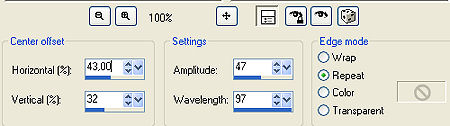
11-
Effects > 3D Effects > Inner Bevel:
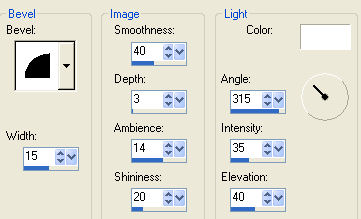
12-
Effects > Drop Shadow > 4/4/80/8,00
o usa la configuración que prefieras.
13- Nueva layer y rellénala con el punto 1 > Arrange > Send to
Bottom
Select All > Inserta el misted del punto 1 - colócalo a tu
gusto.
14- Plugin Flaming Pear > Flood:
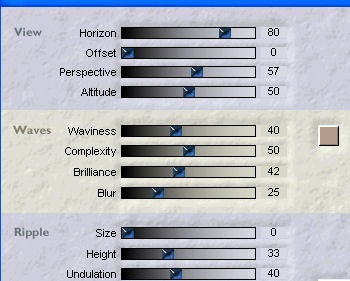
15- Adjust
> Brightness and Contrast > brightness/contrast > 20
16-Aplica una mask del tipo Fade
Layers > Delete
Layers > Merge > Merge Group
17- Inserta tu tube - Adorna a tu gusto
Merge Visible.
18- Image > Canvas Size con la siguiente configuración:
Width= 1000 y Height= 650
Bottom= 50 / Top, Left y Right= 0
19- Layers > New Raster Layer
Layers > Send to Bottom
Rellena con un color capturado de tu trabajo.
20- Layers > Merge > Merge All
21- Firma y guarda en jpeg.
** Tutorial creado el 31/07/2012 por Edith Spigai **
Otro
ejemplo

Créditos:
Tube: By Luz Cristina
Misted: Tube Farouche
Art y Formato: EdithSpigai
Copyright ©2016/2026 - Web Design - NaiseM®

|