|
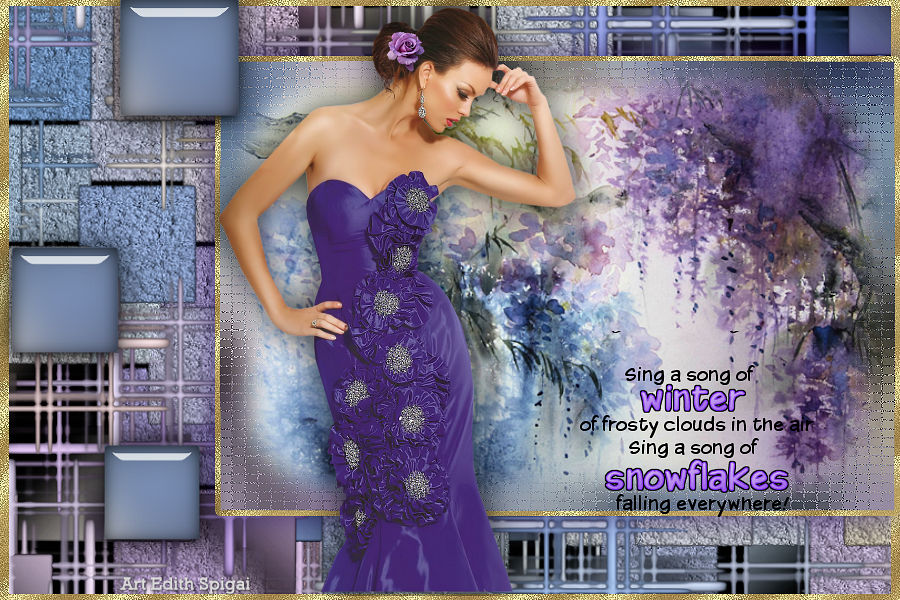 
**UMATRIX**

-Efeitos do PSP_X8
- Plugin Redfield > Umatrix
-Tube
-Misted
-Deco/WordArt
ROTEIRO

Use a setinha para marcar a sua linha
Clique nela e arraste para onde quiser
|
|
1- Escolha um Misted > Edit Copy
2- Paste into selection em uma nova imagem de 900 x 600
3- Effects > Image Effects > Seamless Tiling > Default
4- Layers > Merge All
5- Layers > Promote Background to Layer
6- Plugin Redfield > Umatrix (Configuração do Print.)
Preset anexado.
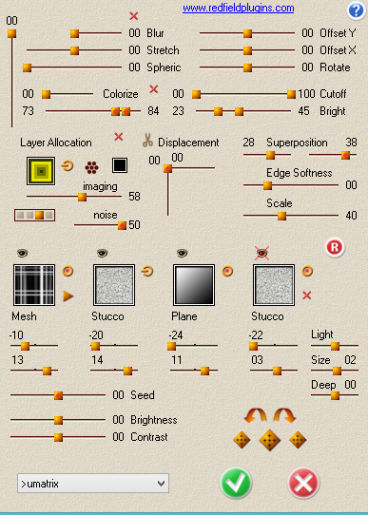
7- Adjust > Sharpen
8- Layer > Duplicate
9- Adjust > Gaussian Blur > 25,00
10- Image > Resize > 75%
11-Selecione a parte transparente com a ferramenta Magic
Wand > Selection > Invert
12- Effects > Texture Effects > Mosaic-Antique
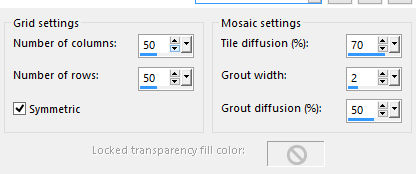
13- Nova Layer > Copie e cole seu misted do item 1
14- Adjust > Brightness and Contrast > Brightness/Contrast
> -30/15
15- Selections > Modify > Select Selection Borders > 5 >
Outside > Anti-alias marcado
16- Preencha com Pattern dourada. Select > None
17- Layers > Merge Down
18- Effects > Drop Shadow > 8/8/80/20 na cor do seu
trabalho.
repetir em negativo.
19- Effects > Image
Effects > OffSet > 106/0 - Custom e Transparente
marcados.
20- Ative a Raster 1 > Image > Resize > 98%
21- Selecione a parte transparente com a ferramenta
Magic Wand e
preencha com Pattern Dourado. Select > None
22- Aplique o Deco_Umatrix_Edith (Colorize se preferir)
Anexado
23- Copie seu tube usando Drop Shadow
24- Coloque o word art de sua preferência.
25- Layers > Merge All
26- Plugin AAA Filters > Custom > Sharp (ou como
preferir...)
27- Assine e salve em jpeg.
** Tutorial Elaborado em São Paulo_Brasil_06/07/2017 por
Edith Spigai **
CRÉDITOS:
Tube: By Adrimar
Misted: By LizzTish
Tutorial: Edith Spigai
Copyright ©2016/2026 - Web Design - NaiseM®

|