|
**
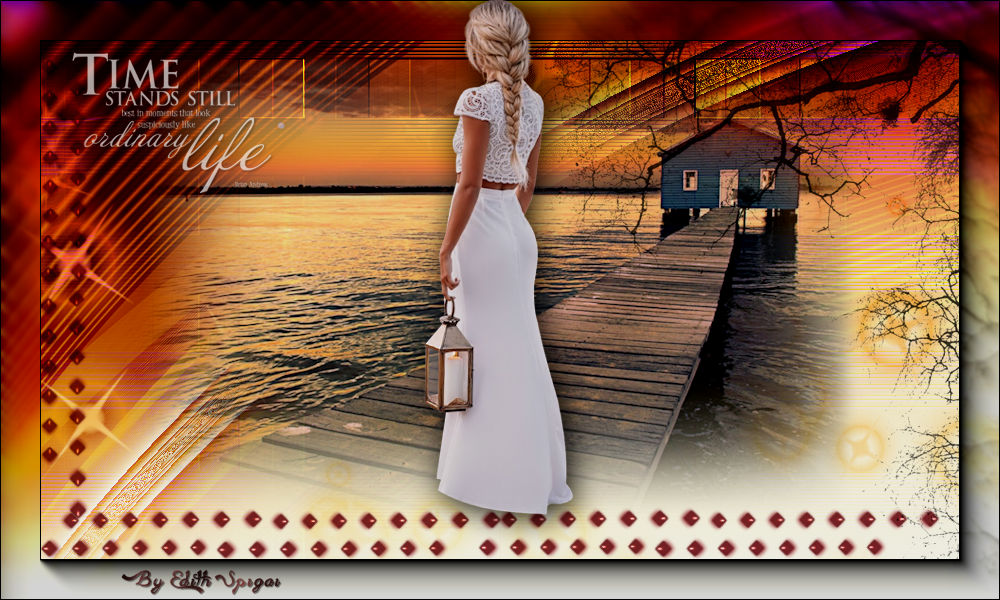
TIME TO WAIT **

-PSP_X7 effects
-Plugin Krusty's Fx Vol.II 2.0
-Plugin Ulead Effects > Particle
-Decoolivia (attached)
-Tree Borders (attached)
-Tube
-Misted
INSTRUCTIONS

Use the little arrow to mark your line
Click it and drag it wherever you like
|
|
1- Open a new 1000 x 600 image and fill it with a
solid color.
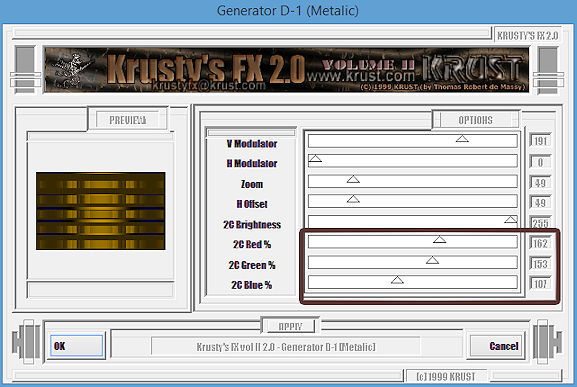
2- Plugin Krusty's Fx Vol.II 2.0 > Generator D-1 (Metalic)
- last settings in the color of your work -
3- New layer and
fill it with a Gold gradient.
4- Layers > Blend Mode > Hard Light or one of your choice.
5- Opacity 70% > Merge Down
6- Effects > User Defined Filter > Emboss_3
7- Layer > Duplicate
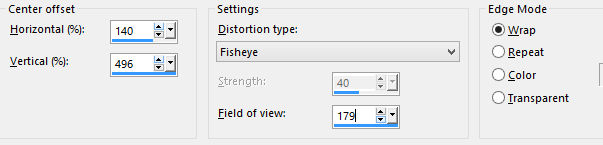
8- Effects > Distortion Effects > Lens Distortion >
140/496/179/Wrap
9- Layers > Blend
Mode > Soft Light
10- Duplicate Layer
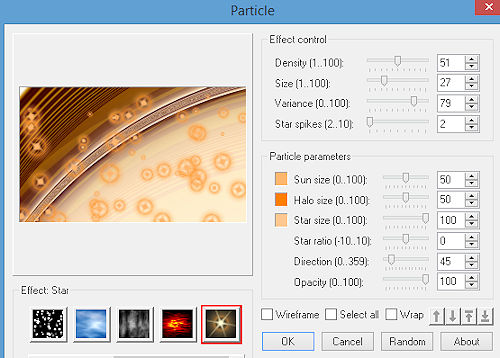
11- Plugin Ulead Effects > Particle
12- Layers > Blend Mode > Overlay
13- Go back to the copy of Raster 1 > Opacity 50%
14- Insert the landscape tube
15- Insert the tube "Tree Borders_18" and place it on the left
side. (optional)
16- Layers > Merge Visible
17- Plugin AAAFrames > Foto Frame Default > 40/
0/0/0/0/0/0/100
18- Insert the main tube, Drop Shadow
19- Apply "decolivia 1 " decolivia 2
20- Apply brushes as you like.
21- Layers > Merge Visible
22- Adjust > Brightness and Contrast > Brightness/Contrast
> -10/0
23- Sign it and save as jpeg.
** Tutorial created in SP_29/06/2016 by Edith Spigai
**
Credits:
Tubes: By Grisi
Misted: By Min@
Created by EdithSpigai
Copyright ©2016/2026 - Web Design - NaiseM®

|