|
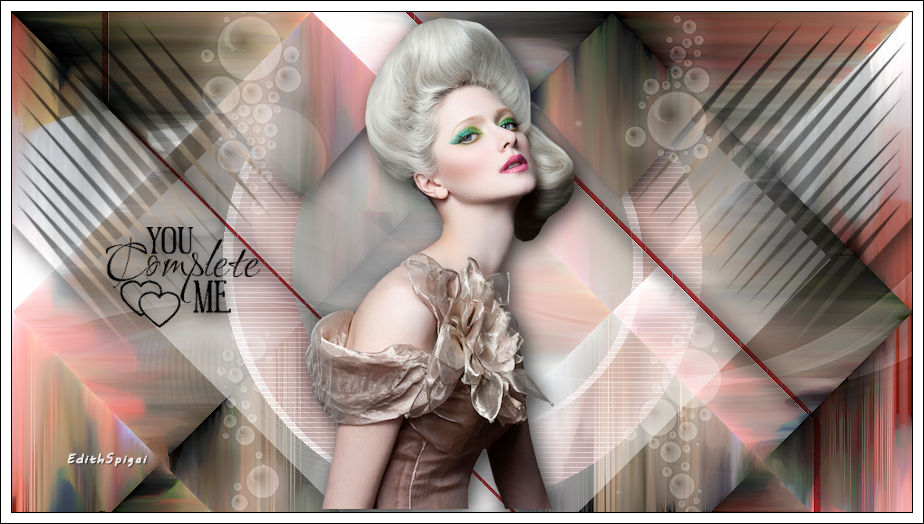 
**KARISMA**

-PSP_X7
Effects
-Plugin Mehdi
-Plugin Toadies
-Plugin Eye Candy 3.1
- FM Tile Tools
-Plugin VM Distortion
-Plugin Carolaine Sensibility
Plugin Unplugged Shapes
-Tubes
Instructions

Use the little arrow to mark your line
Click it and drag it wherever you like
|
|
1- Open
a new image of 900 x 500
2-Open a landscape image (misted) - Edit Copy.
3- Select All and paste into selection the chosen misted
> select none.
4- Effects > Image Effects > Seamless Tiling > Default
5- Merge All > Layers > Promote Background to layer
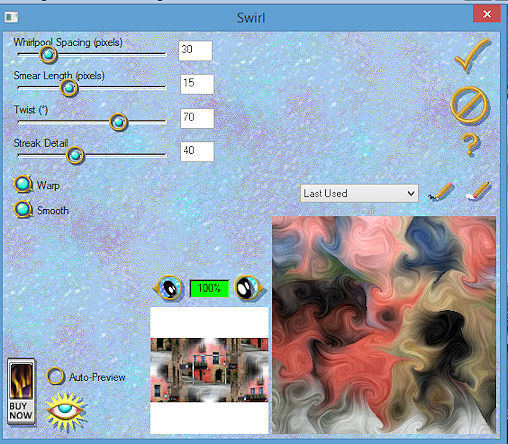
6- Plugin Eye Candy 3.1 > Swirl > 30/15/70/40
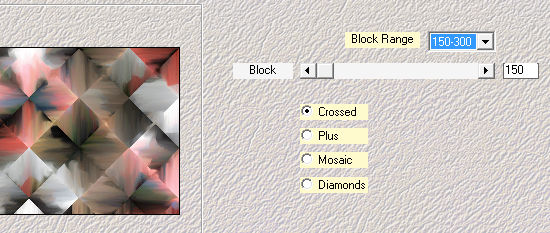
7- Plugin
Mehdi > Sorting Tiles >
8- FM Tile
Tools > Blend Emboss
9- Duplicate Layer
10- On the copy of the layer apply:
Plugin Unplugged Shapes > Rotocube >
128/128/255/255/255/150
11- New Layer > Fill with white #ffffff
12- Apply the Mask Narah_Mask_0474
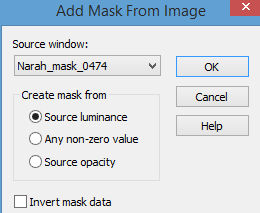
Merge
Group > Opacity 65
13- New Layer > Fill with a Linear gradient -
Angle 0 / Repeats 1 - invert unchecked
in the colors of your work.
14- Plugin VM Distortion > Circulator >
87/34/37/38/119/0
15- Plugin Carolaine Sensibility > CS_Texture... >
52/0/175/10
16- Layers > Blend Mode > Overlay
17- Open the Bolinhas_Di image and paste it as a
new layer
Layers > Blend Mode > Soft Light
18- New
Layer > Activate the Selection Tool in rectangle
> Custom Selections
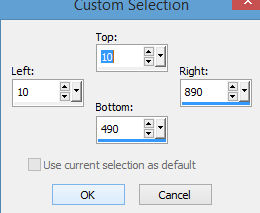
19-
Selections > Modify > Select Selection Borders
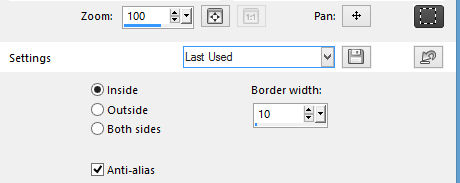
20-
Fill this border with the dark color of your work.
21- Plugin Toadies > Play Mosaic_2 > 5/5/5/255
22- Image Resize > 80%
23- Effects > Geometric Effects > Skew > vertical/ -45/
Repeat
Layers > Blend Mode > Overlay
24- Close all the layers and activate raster 1
Apply the Mask Wood_16 with invert checked.
Merge Group.
25- Layers
> Arrange > Move Up
26- Apply the main tube using Drop Shadow
27- Paste the text marcita_wood or another of your
choice.
28- Merge Visible.
29- Adjust > Brightness and Contrast > Brightness/contrast
> -15/0
30- Image > Add Borders > 2 px in black >#000000
31- Image
> Add Borders > 10 px in white >#ffffff
32- Image > Add Borders > 2 px in black >#000000
33-Layers > Merge > Merge All
34- Sign it and save as jpeg.
** Tutorial created in SP_23/11/2015 by Edith
Spigai **

Credits:
Tubes - By Ana Ridzi
Mask_Narah_0474
Mask_Wood_16
Text_Marcita Wood
Tutorial EdithSpigai
Copyright ©2016/2026 - Web Design - NaiseM®

|