|
**
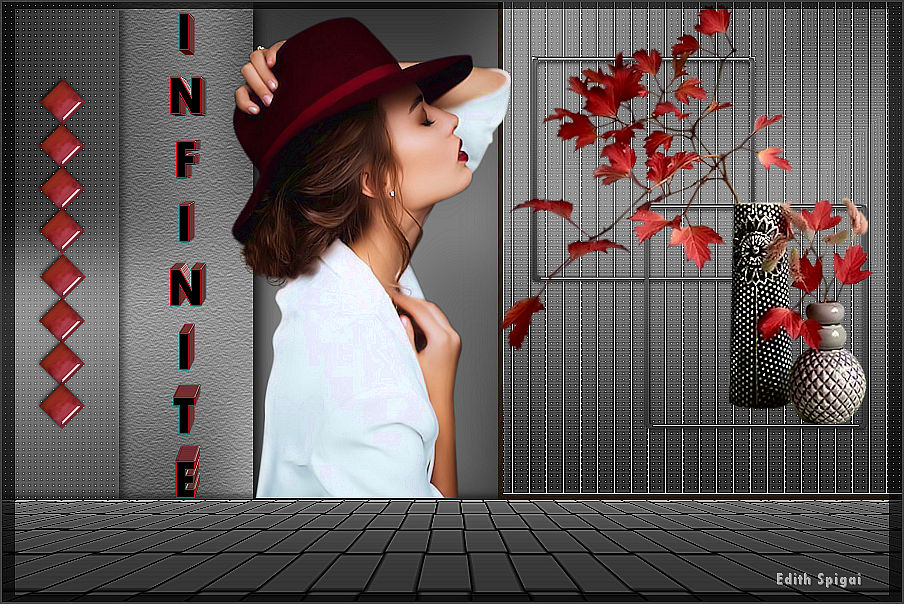
INFINITE **

Efectos del PSP_X8
Plugin Mehdi > Sorting Tiles
Plugin Neology > Line Art
Plugin Carolaine and Sensibility > CS_LDots
Plugin Texture > Texturizer
Plugin MuRa's Meister > Perspective Tiling
Plugin AAA Filters > Custom
Tubes/Deco
INSTRUCCIONES
Usa la flechita para marcar tu línea
Haz clic en ella y arrástrala adonde quieras
|
|
1- Abre la imagen transparente de 900 x 600.
2- Rellena con un degradado lineal formado por dos
colores:
Foreground = ( #aeaeae)
Background = (#383838)
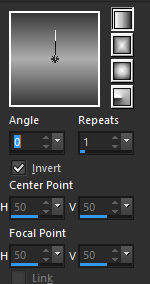
3- Adjust > Gaussian Blur > 20
4- Plugin Mehdi > Sorting Tiles:
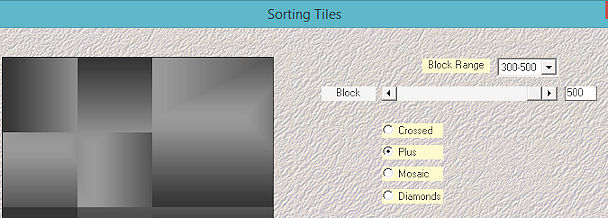
5- Effects > Enhance
6- Selections > Load/Save Selection > Load Selection
From Disk > selection_1
7- Promote Selection to Layer > Select > None
8- Plugin Neology > Line Art > 17/255/255/255/1/255
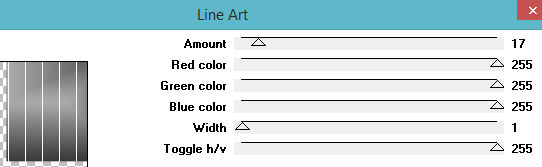
9- Plugin Carolaine and Sensibility > CS_LDots > 124/3/2
10- Adjust > Sharpen
11- Effects > Drop Shadow > 5/-5/50/1,00 en color negro
#000000.
12-Activa la Raster 1 > Selections > Load/Save Selection >
Load Selection From Disk > selection_2
13- Promote Selection to Layer
14- Selections > Modify > Contract > 10
15- Delete en el teclado > Select None
16- Plugin Alien Skin Eye Candy Impact > Glass > Clear
17- Layers > Arrange > Bring to Top
18- Effects > Image Effects > OffSet > (500) /(215) -
Custom y Transparente marcados
19- Duplicate Layer
20- Effects > Image Effects > OffSet > (125) /(-164) -
Custom y Transparente marcados
21- Layers > Merge Down
22-Activa la Raster 1 > Selections > Load/Save Selection >
Load Selection From Disk > selection_3
23- Promote Selection to Layer
24- Adjust > Gaussian Blur > 30,00 - Select > None
25- Plugin Carolaine and Sensibility > CS_LDots 124/3/2
26- Adjust > Sharpen
27- Effects > Drop Shadow > 5/5/50/15,00 en color negro
#000000.
28- Activa la Raster 1 > Selections > Load/Save Selection
> Load Selection From Disk > selection_4
29- Promote Selection to Layer
30- Adjust > Gaussian Blur > 30,00 - Select > None
31- Plugin Texture > Texturizer
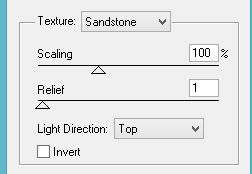
32- Effects > Drop Shadow > 5/5/50/15,00 en color negro
#000000.
33- Activa la Raster 1 > Selections > Load/Save Selection
> Load Selection From Disk > selection_5
34-Promote Selection to Layer
35- Adjust > Gaussian Blur > 30,00 - Select > None
36- Effects > 3D effects > Cutout
37- Activa la Raster 1 > Duplicate.
38- Adjust > Gaussian Blur > 30,00
39- Plugin Neology > Digital Weaver > 33/76
40- Plugin MuRa's Meister > Perspective Tiling >
60/43/0/16/0/0/100/255
41- Adjust > Sharpen More
42- Effects > Drop Shadow > 0/0/80/40,00 en color negro
#000000.
43- Pega el Deco_Infinite en la layer promoted selection 2
44- En la layer promoted selection 3 > escribe la palabra
Infinite.

45- Plugin Alien Skin Eye Candy 5: Impact > Extrude >
Small Offset. No Smoothing
46- En la layer promoted selection 1 > Aplica el Floral
47- Aplica el tube en la promoted selection 4
48- Layers > Merge Visible
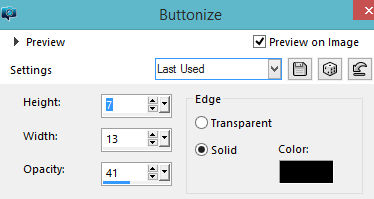
49- Effects > Buttonize > 2 veces
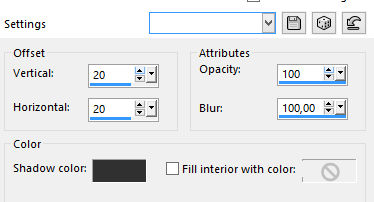
50- Image > Add Borders > 2 pxs en el color oscuro de tu
trabajo
51- Plugin AAA Filters > Custom > Sharp
52- Layers > Merge All
53- Firma y guarda en jpeg.
** Tutorial elaborado en São Paulo_Brasil_04/05/2019 por
Edith Spigai **
Créditos:
Tube: LB Tubes
Floral: LB Tubes
Tutorial: Edith Spigai
Copyright ©2016/2026 - Web Design - NaiseM®

|